
wkhtmltopdf Is Archived: 7 Alternatives for HTML to PDF in 2026
 By APITemplate.io
wkhtmltopdf was archived in 2023 and renders with a WebKit from 2012. Here are 7 tested alternatives, each wkhtmltopdf option mapped to Chrome, and migration code for Node.js, Python and C#.
TL;DR:
What This Blog Covers:
The best wkhtmltopdf alternatives in 2026, now that the project is archived: which one fits your stack, how each wkhtmltopdf option maps to Chrome, and tested migration code for the same invoice.
Key Points:
- wkhtmltopdf’s last release, 0.12.6, came out in June 2020, and its GitHub repository was archived in January 2023
- Its WebKit engine dates from 2012, so flexbox, CSS grid and CSS variables don’t render as written
- For templates with modern CSS or JavaScript, move to a Chromium-based tool: Puppeteer, Playwright, headless Chrome or Gotenberg
- For reports from HTML you control, WeasyPrint and Prince need no browser and can number pages from CSS
- Put the page size, margins and footer in an
@pagerule, and the same HTML works in all of them
Best For:
Developers running wkhtmltopdf, or a wrapper such as pdfkit, WickedPDF, Snappy or DinkToPdf, who need a maintained replacement.
wkhtmltopdf is archived. Its last release shipped in June 2020, its GitHub repository went read-only in January 2023, and Debian no longer ships it. It still runs, but nobody will fix its rendering bugs or its security issues.
The best wkhtmltopdf alternatives fall into two groups. Headless Chrome tools (Puppeteer, Playwright, Gotenberg) render modern CSS and JavaScript the way a browser does. WeasyPrint and Prince skip the browser and suit reports built from HTML you control. That is also the split the wkhtmltopdf maintainer recommends on the project’s status page.
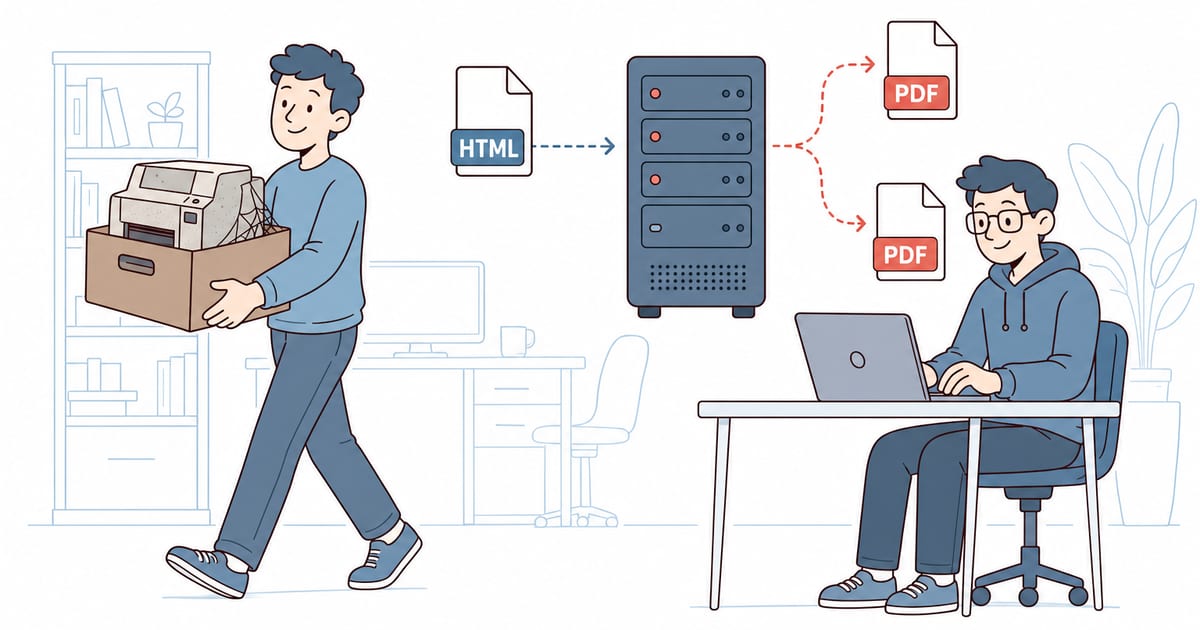
This guide shows what breaks when wkhtmltopdf prints a modern invoice, compares seven alternatives, maps each wkhtmltopdf option to Chrome, and migrates the invoice to each one.
Every example was run with wkhtmltopdf 0.12.6.1, Chrome 157, Puppeteer 25.18, Playwright 1.65, PuppeteerSharp 25.18 on .NET 10, WeasyPrint 70, Prince 17 and Gotenberg 9.9.1.
Is wkhtmltopdf Deprecated?
Yes, in every way that matters. Nobody has announced a formal end of life, but:
- No release since 2020: 0.12.6 shipped on 10 June 2020. The status page promised a final 0.12.7 “by Aug 2020”, and it never came.
- Archived: the wkhtmltopdf repository was archived on 2 January 2023, and the packaging repository on 28 August 2023. Its last installers, 0.12.6.1-3, stop at Debian 12, Ubuntu 22.04 and Fedora 37.
- An old engine: in the maintainer’s words, “the WebKit in it hasn’t been updated since 2012”.
- Dropped by distributions: Debian removed wkhtmltopdf from testing in February 2025, so Debian 13 doesn’t include it.
- Unfixed security issues: CVE-2022-35583, a server-side request forgery (SSRF) in 0.12.6, is rated 9.8 critical, and no release fixes it. The status page’s first recommendation is “Do not use wkhtmltopdf with any untrusted HTML”.
The wrappers are going the same way. python-pdfkit now says it “has been deprecated to match the wkhtmltopdf project status”, and DinkToPdf’s repository hasn’t changed since April 2020.
What Breaks When wkhtmltopdf Prints Modern CSS
Our test page is a one-page invoice: INV-1001 for Acme Corp, two line items and a total of $1,090.00. Its CSS uses what modern templates use: a flexbox header on a colored band, a two-column grid for the addresses, and CSS variables for the colors.
We printed it with the same page size, margins and footer in wkhtmltopdf 0.12.6 and in Chrome:
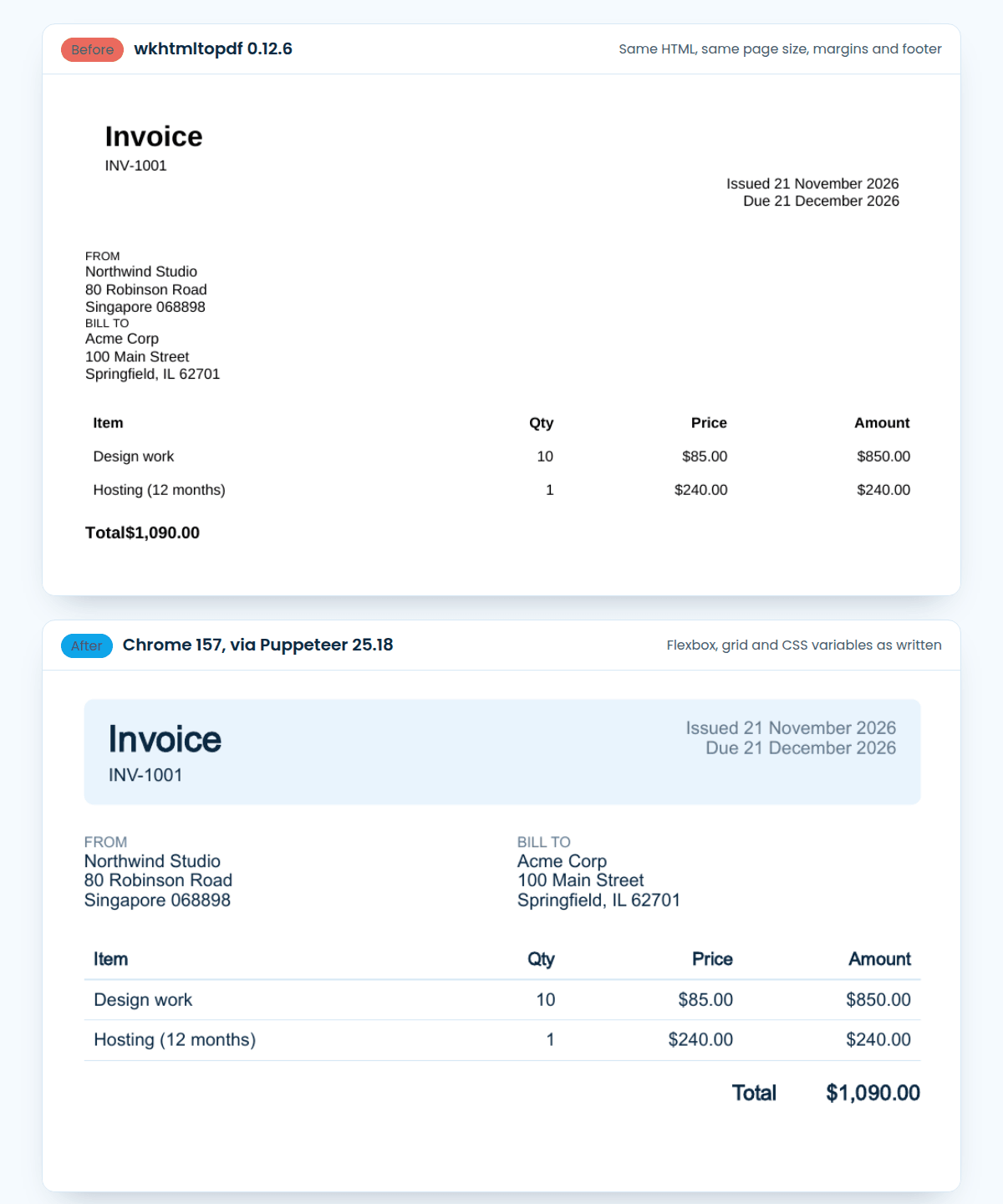
What wkhtmltopdf got wrong:
- The header: it ignored
display: flex, so the dates dropped below the title instead of sitting beside it. - The colors: no band, no table rules and black text, because it doesn’t support CSS variables such as
var(--band). - The addresses: stacked instead of side by side, with no CSS grid.
- The total: printed as “Total$1,090.00”, without the flexbox gap.
- The text size: about 18% smaller than Chrome’s, from wkhtmltopdf’s “smart shrinking”. With
--disable-smart-shrinkingit came within 2% of Chrome.
The footer, “Page 1 of 1”, worked in both. Templates written for wkhtmltopdf often avoid flexbox and grid already, so check your old workarounds when you switch: a --zoom factor added to make up for the shrinking will make your text too large in Chrome.
The 7 Best wkhtmltopdf Alternatives
| Alternative | Engine | Use it from | License or price | Best for |
|---|---|---|---|---|
| Puppeteer | Chrome | Node.js, or PuppeteerSharp in .NET | Apache 2.0 (PuppeteerSharp: MIT) | Node.js and .NET apps |
| Playwright | Chromium | Python, Node.js, Java, .NET | Apache 2.0 | Python and Java apps |
| Headless Chrome | Chrome | The command line | Free | Shell scripts and cron jobs |
| Gotenberg | Chromium and LibreOffice | Any language, over HTTP | MIT | One shared PDF service in Docker |
| WeasyPrint | Its own engine, no JavaScript | Python or the command line | BSD | Reports from HTML you control |
| Prince | Its own engine | The command line, Python and Node.js packages | Commercial, $3,800 per server | Print-quality documents |
| APITemplate.io | Chromium, hosted | Any language, REST API | Free plan with 50 PDFs a month | Not running a browser at all |
The first four print with Chrome, so a template that looks right in Chrome’s print preview will look right in them. WeasyPrint and Prince implement CSS themselves. They don’t run your JavaScript the way a browser does, but they support print CSS that Chrome doesn’t, such as page numbers in a table of contents.
Map wkhtmltopdf Options to Chrome
Most of a migration is translating flags. This table maps wkhtmltopdf’s options to Puppeteer’s page.pdf(). Playwright uses the same names in snake_case for Python (print_background), and PuppeteerSharp in PascalCase (PrintBackground). pdfkit’s options are the wkhtmltopdf flags without the dashes, so the table covers it too.
| wkhtmltopdf | Puppeteer page.pdf() |
Notes |
|---|---|---|
--page-size A4, -O Landscape |
format: 'A4', landscape: true |
|
-T, -B, -L, -R |
margin: { top, bottom, left, right } |
Strings with units, such as '20mm' |
--background (the default) |
printBackground: true |
Chrome’s default is false, which drops background colors |
--footer-center "Page [page] of [topage]" |
footerTemplate with <span class="pageNumber"> and <span class="totalPages"> |
Needs displayHeaderFooter: true. Set a headerTemplate too, or Chrome prints the date and title at the top |
[page], [topage], [date], [title], [webpage] |
Classes pageNumber, totalPages, date, title, url |
|
--header-html header.html |
headerTemplate, as an HTML string |
Templates don’t run scripts: drop the subst() script and use the classes above |
--print-media-type |
The default | Chrome prints with your @media print styles; wkhtmltopdf uses screen styles unless you pass this flag |
--zoom, --disable-smart-shrinking |
Remove them | Chrome prints CSS sizes as written. scale (0.1 to 2) is there if you need it |
--javascript-delay 2000 |
waitUntil: 'networkidle0' or page.waitForSelector() |
Wait for a condition, not a fixed time |
--window-status ready |
page.waitForFunction('window.status === "ready"') |
|
--outline (the default) |
outline: true |
Experimental in Puppeteer, and off by default |
--enable-local-file-access |
page.goto(pathToFileURL('invoice.html').href) |
With setContent(), relative image paths don’t load |
toc, cover |
None | Build them in your HTML. Chrome can’t print page numbers in a contents list; WeasyPrint and Prince can, with target-counter() |
The full list of options is in Puppeteer’s PDFOptions reference.
Or Move the Options Into CSS
The other route is to put the page setup in your HTML, where every engine on this list can read it:
@page {
  size: A4;
  margin: 20mm 15mm;
  @bottom-center {
    content: "Page " counter(page) " of " counter(pages);
    font: 9pt Helvetica, Arial, sans-serif;
    color: #607890;
  }
}With this rule in the invoice, headless Chrome, Gotenberg, WeasyPrint and Prince all printed A4 with the page-number footer, and no options at all. Chrome has supported footers like this since Chrome 131. Set the font in the @bottom-center rule: the footer doesn’t inherit the body’s font, and Chrome printed it in a serif font until we did.
Migrate the Invoice to Each Alternative
The starting point is a typical wkhtmltopdf call:
wkhtmltopdf --page-size A4 \
  --margin-top 20mm --margin-bottom 20mm --margin-left 15mm --margin-right 15mm \
  --footer-center "Page [page] of [topage]" --footer-font-size 9 \
invoice.html invoice.pdfShell Scripts: Headless Chrome
If wkhtmltopdf runs from a script or a cron job, Chrome itself is the closest swap. With the @page rule above in invoice.html:
google-chrome --headless --no-pdf-header-footer --print-to-pdf=invoice.pdf invoice.htmlWithout --no-pdf-header-footer, Chrome adds its own header with the date and the page title. Chrome printed the background band with no extra flag. On Linux the command is google-chrome or chromium, depending on the package you installed.
Node.js: Puppeteer
Puppeteer controls Chrome from Node.js, and it’s what the wkhtmltopdf status page suggests for pages that rely on JavaScript. Install it with npm install puppeteer, which downloads a matching Chrome. This script reproduces the wkhtmltopdf call, with each flag noted:
import puppeteer from 'puppeteer';
import { readFile } from 'node:fs/promises';

const html = await readFile('invoice.html', 'utf8');

const browser = await puppeteer.launch();
const page = await browser.newPage();
await page.setContent(html, { waitUntil: 'networkidle0' });

await page.pdf({
  path: 'invoice.pdf',
  format: 'A4',                                    // --page-size A4
  margin: { top: '20mm', bottom: '20mm',           // -T 20mm -B 20mm
            left: '15mm', right: '15mm' },         // -L 15mm -R 15mm
  printBackground: true,                           // wkhtmltopdf prints backgrounds by default
  displayHeaderFooter: true,
  headerTemplate: '<span></span>',                 // no header
  footerTemplate: `
    <div style="width: 100%; text-align: center; font: 9pt Helvetica, Arial, sans-serif; color: #607890;">
      Page <span class="pageNumber"></span> of <span class="totalPages"></span>
    </div>`,                                       // --footer-center "Page [page] of [topage]"
});

await browser.close();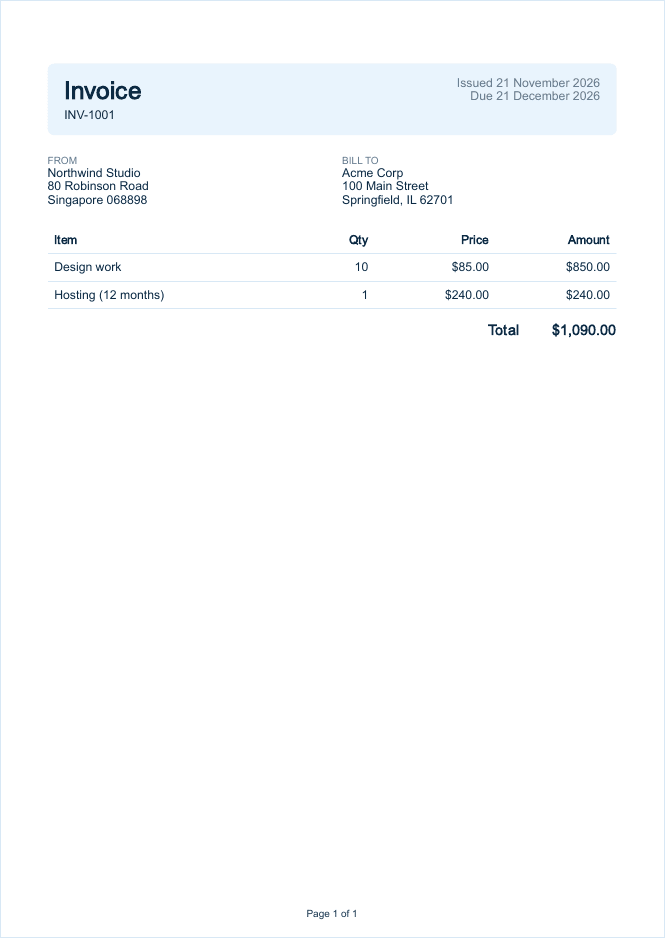
Tip: If your HTML loads images or stylesheets by relative path, open the file with
page.goto(pathToFileURL('invoice.html').href)instead ofsetContent(). That replaces--enable-local-file-access.
Our Puppeteer HTML to PDF guide covers page breaks, fonts and running it on AWS Lambda.
Python: Playwright Instead of pdfkit
This is the pdfkit version of the same call:
import pdfkit

options = {
    "page-size": "A4",
    "margin-top": "20mm",
    "margin-bottom": "20mm",
    "margin-left": "15mm",
    "margin-right": "15mm",
    "footer-center": "Page [page] of [topage]",
    "footer-font-size": "9",
}
pdfkit.from_file("invoice.html", "invoice.pdf", options=options)Playwright for Python drives Chromium with the same options as Puppeteer. Install it with pip install playwright, then download its browser with playwright install chromium:
from pathlib import Path
from playwright.sync_api import sync_playwright

html = Path("invoice.html").read_text()

footer = (
    '<div style="width: 100%; text-align: center; font: 9pt Helvetica, Arial, sans-serif; color: #607890;">'
    'Page <span class="pageNumber"></span> of <span class="totalPages"></span></div>'
)

with sync_playwright() as p:
    browser = p.chromium.launch()
    page = browser.new_page()
    page.set_content(html, wait_until="networkidle")
    page.pdf(
        path="invoice.pdf",
        format="A4",
        margin={"top": "20mm", "bottom": "20mm", "left": "15mm", "right": "15mm"},
        print_background=True,
        display_header_footer=True,
        header_template="<span></span>",
        footer_template=footer,
    )
browser.close()The output matched Puppeteer’s. To compare the other Python libraries, see how to convert HTML to PDF in Python without wkhtmltopdf.
Python Reports: WeasyPrint
WeasyPrint is the other replacement the wkhtmltopdf maintainer suggests, for reports built from HTML you control. It has its own layout engine, so there’s no browser to install, but it doesn’t run JavaScript. It takes the page setup from the @page rule:
from weasyprint import HTML

HTML("invoice.html").write_pdf("invoice.pdf")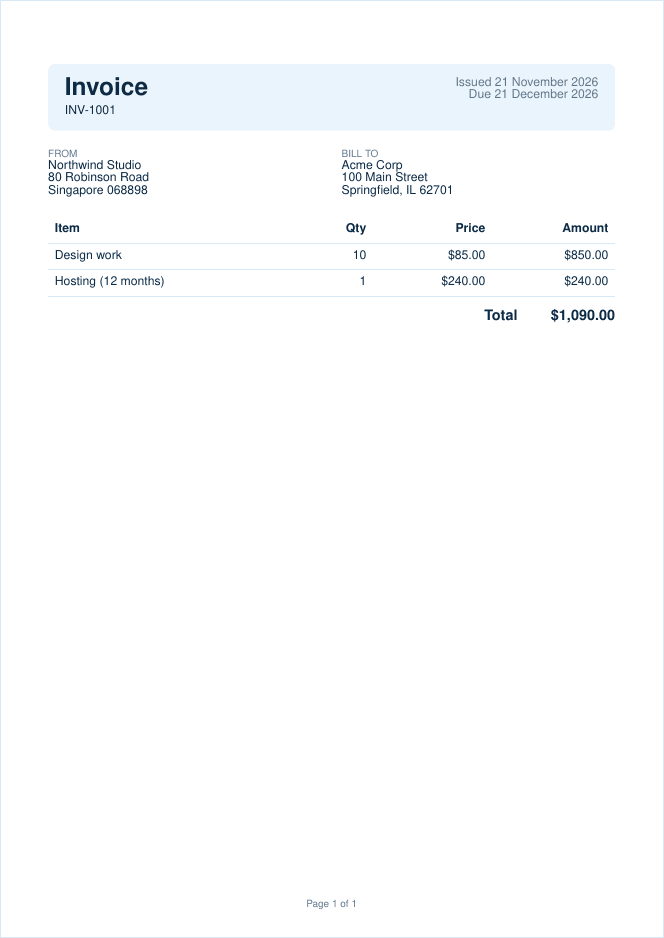
WeasyPrint 70 printed the flexbox header, the grid and the CSS variables correctly. It needs Python 3.10 or later and the Pango library 1.44 or later; its installation guide lists the packages for each operating system. There’s also a command line: weasyprint invoice.html invoice.pdf.
C#: PuppeteerSharp Instead of DinkToPdf
DinkToPdf wraps the wkhtmltopdf library, so it carries every problem above. PuppeteerSharp is a .NET port of Puppeteer, with the same options in PascalCase. Add it with dotnet add package PuppeteerSharp:
using PuppeteerSharp;
using PuppeteerSharp.Media;

var html = await File.ReadAllTextAsync("invoice.html");

await new BrowserFetcher().DownloadAsync();
await using var browser = await Puppeteer.LaunchAsync(new LaunchOptions { Headless = true });
await using var page = await browser.NewPageAsync();
await page.SetContentAsync(html);

await page.PdfAsync("invoice.pdf", new PdfOptions
{
    Format = PaperFormat.A4,
    MarginOptions = new MarginOptions { Top = "20mm", Bottom = "20mm", Left = "15mm", Right = "15mm" },
    PrintBackground = true,
    DisplayHeaderFooter = true,
    HeaderTemplate = "<span></span>",
    FooterTemplate = """
        <div style="width: 100%; text-align: center; font: 9pt Helvetica, Arial, sans-serif; color: #607890;">
          Page <span class="pageNumber"></span> of <span class="totalPages"></span>
        </div>
        """,
});BrowserFetcher downloads Chrome on the first run. We ran this on .NET 10 in a Docker container, where Chrome also needed its system libraries (such as libnss3 and libgbm1) installed in the image. Our guide to HTML to PDF in C# compares the other .NET libraries.
Any Language: Gotenberg
Gotenberg puts Chromium behind an HTTP API in one Docker container, so any language with an HTTP client can use it. It’s a good fit when several services each shipped their own wkhtmltopdf binary. With the @page rule in the invoice, saved as index.html:
docker run --rm -p 3000:3000 gotenberg/gotenberg:9

curl --form files=@index.html \
  --form preferCssPageSize=true \
  --form printBackground=true \
  -o invoice.pdf \
http://localhost:3000/forms/chromium/convert/htmlWithout preferCssPageSize=true, Gotenberg ignores the CSS page size and prints on US Letter. It also converts Word and Excel files with LibreOffice.
Print-Heavy Documents: Prince
Prince is the commercial engine the wkhtmltopdf status page recommends next to WeasyPrint. It leads on print CSS, such as running headers, footnotes and numbered tables of contents. Prince 17 now installs from PyPI or npm, engine included:
pip install prince-pdf
prince invoice.html -o invoice.pdfIt printed the invoice correctly from the @page rule. Without a license, Prince adds its logo to the first page. A server license costs $3,800, one-time, with 12 months of upgrades. DocRaptor sells Prince as a hosted API; it’s in our comparison of the best HTML to PDF APIs.
Ruby and PHP: Grover and Browsershot
The Ruby and PHP wrappers also call wkhtmltopdf, so they need replacing too. We didn’t run these libraries for this guide, but both drive Puppeteer, so you’ll need Node.js on the server:
- WickedPDF and PDFKit (Ruby): Grover 2.0 renders with Puppeteer and Chromium and takes Puppeteer’s options in snake_case (
print_background), so the mapping table applies. - Snappy and phpwkhtmltopdf (PHP): Browsershot 5.5 renders with Puppeteer. KnpLabs is looking for maintainers for Snappy.
- No Node.js on the server: run Gotenberg and call it with its official PHP client, gotenberg-php, or over plain HTTP from Ruby.
Skip the Infrastructure: One API Call
Each alternative above still needs Chrome, a Python library or a container running somewhere. With APITemplate.io’s HTML to PDF API, you send the HTML and get the PDF back from our Chromium servers. The footer uses the same pageNumber and totalPages classes as Puppeteer:
jq -n --rawfile html invoice.html '{
  body: $html,
  settings: {
    paper_size: "A4",
    margin_top: "40",
    margin_bottom: "40",
    print_background: "1",
    displayHeaderFooter: true,
    custom_header: "<span></span>",
    custom_footer: "<div style=\"width: 100%; text-align: center; font-size: 9pt;\">Page <span class=\"pageNumber\"></span> of <span class=\"totalPages\"></span></div>"
  }
}' | curl -s https://rest.apitemplate.io/v2/create-pdf-from-html \
  -H "X-API-KEY: YOUR_API_KEY" \
  -H "Content-Type: application/json" \
--data @-The response is JSON with a download_url for the PDF. We ran this request against a mock of the endpoint with curl and jq 1.8. You can also store the invoice as a template in Jinja2 syntax and send only the data; the docs compare the four ways to generate a PDF. The Free plan includes 50 PDFs a month, and PDF Basic is $24 a month ($19 billed yearly) for 3,000. To convert a single file without code, use the free HTML to PDF converter.
How to Choose a wkhtmltopdf Replacement
- Your templates use JavaScript or modern CSS: pick a Chromium-based tool. Use Puppeteer in Node.js, Playwright in Python or Java, and PuppeteerSharp in .NET.
- wkhtmltopdf runs from shell scripts: headless Chrome’s
--print-to-pdf, with the page setup in@page. - Many services, or no browser in your app servers: one Gotenberg container, or a hosted API.
- Reports from HTML you control: WeasyPrint, which also handles contents pages with page numbers.
- Books and print-quality documents: Prince, if the license fits your budget.
FAQ
Is wkhtmltopdf deprecated?
Yes. Its last release was 0.12.6 in June 2020, its GitHub repository was archived on 2 January 2023, and its status page recommends other tools. It still runs, but it gets no bug or security fixes.
What is the best alternative to wkhtmltopdf?
For HTML that uses modern CSS or JavaScript, a Chromium-based tool such as Puppeteer, Playwright or Gotenberg. For reports from HTML you control, WeasyPrint (free) or Prince (commercial), which the wkhtmltopdf maintainer also recommends.
Does wkhtmltopdf support flexbox and CSS grid?
Not as written. In our test, wkhtmltopdf 0.12.6 ignored display: flex, CSS grid and CSS variables. Its WebKit engine hasn’t been updated since 2012.
Is wkhtmltopdf safe to use?
Only with HTML you trust. CVE-2022-35583, an SSRF rated 9.8 critical, affects 0.12.6, and the status page warns that untrusted HTML “can lead to complete takeover of the server”.
What replaces pdfkit, WickedPDF and DinkToPdf?
In Python, Playwright or WeasyPrint; python-pdfkit itself is marked deprecated. In C#, PuppeteerSharp. In Ruby, Grover, and in PHP, Browsershot or Gotenberg.
Conclusion
wkhtmltopdf won’t get another release, and its engine can’t print the CSS that templates use today. For most teams the move is to Chromium, through Puppeteer, Playwright, PuppeteerSharp or Gotenberg, with the option table above doing most of the work. If your documents are print-first reports, WeasyPrint or Prince are the closer fit.
Sign up for a free account and generate up to 50 PDFs or images a month for free.
Other Blog Articles
C# Generate PDF: Create, Save and Export PDFs in .NET (5 Libraries Compared)
Five ways to generate a PDF in C#, tested on .NET 10: QuestPDF, PDFsharp and MigraDoc, iText, PuppeteerSharp and IronPDF. Code that creates the same invoice, saves it and returns it from ASP.NET Core.
How to Generate PDFs From JSON Data (Node.js, Python and API Examples)
Turn JSON data into PDF documents with code: fill an HTML template with Handlebars or Jinja2 and print it, build the PDF with pdfmake, turn any JSON file into tables, or send the JSON to an API.
Best HTML to PDF APIs in 2026: Pricing, Rendering and Free Tiers Compared
The best HTML to PDF APIs in 2026, from PDFShift and DocRaptor to self-hosted Gotenberg, compared on rendering engine, free tier and what 1,000 PDFs a month cost.