Generate Your First PDF
Let's walk through creating a simple PDF from start to finish.
Video Tutorial
Watch this walkthrough to see how to build dynamic PDFs with the HTML editor, customize templates using Jinja2, and generate the final output via the REST API:
Step 1: Create a PDF template
- Go to Manage Templates and click New Template
- Name your template and choose an editor:
- Create PDF with HTML — write HTML/CSS with Jinja2 templating. Best for complex layouts and full control over styling. Supports custom JavaScript.
- Create PDF with Visual Editor — a WYSIWYG editor similar to Microsoft Word. No coding required.
- Select a starter template or start from scratch, then click Create
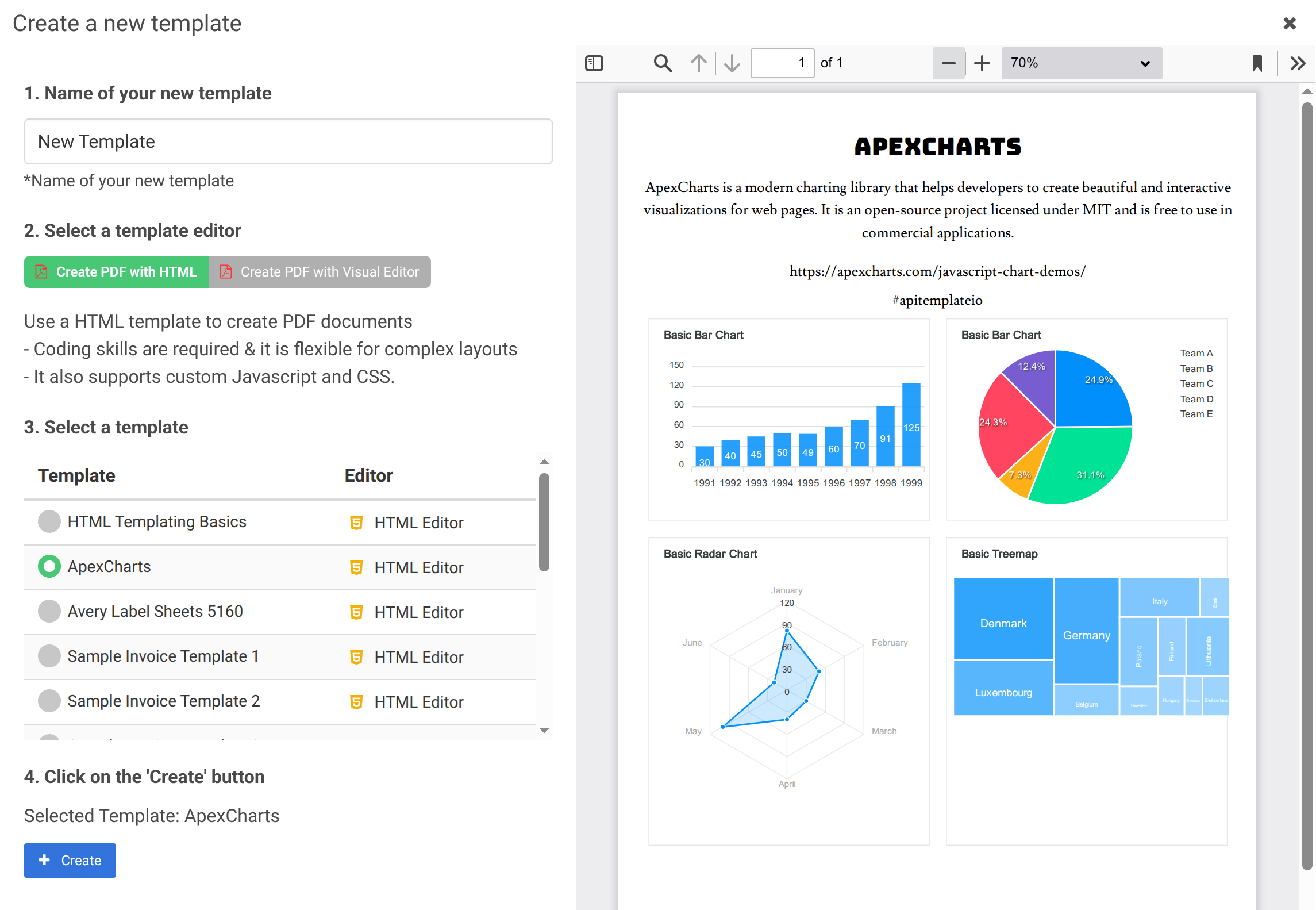
This guide uses the HTML Editor. Once your template is created, you'll see four tabs in the editor along with a live preview panel:
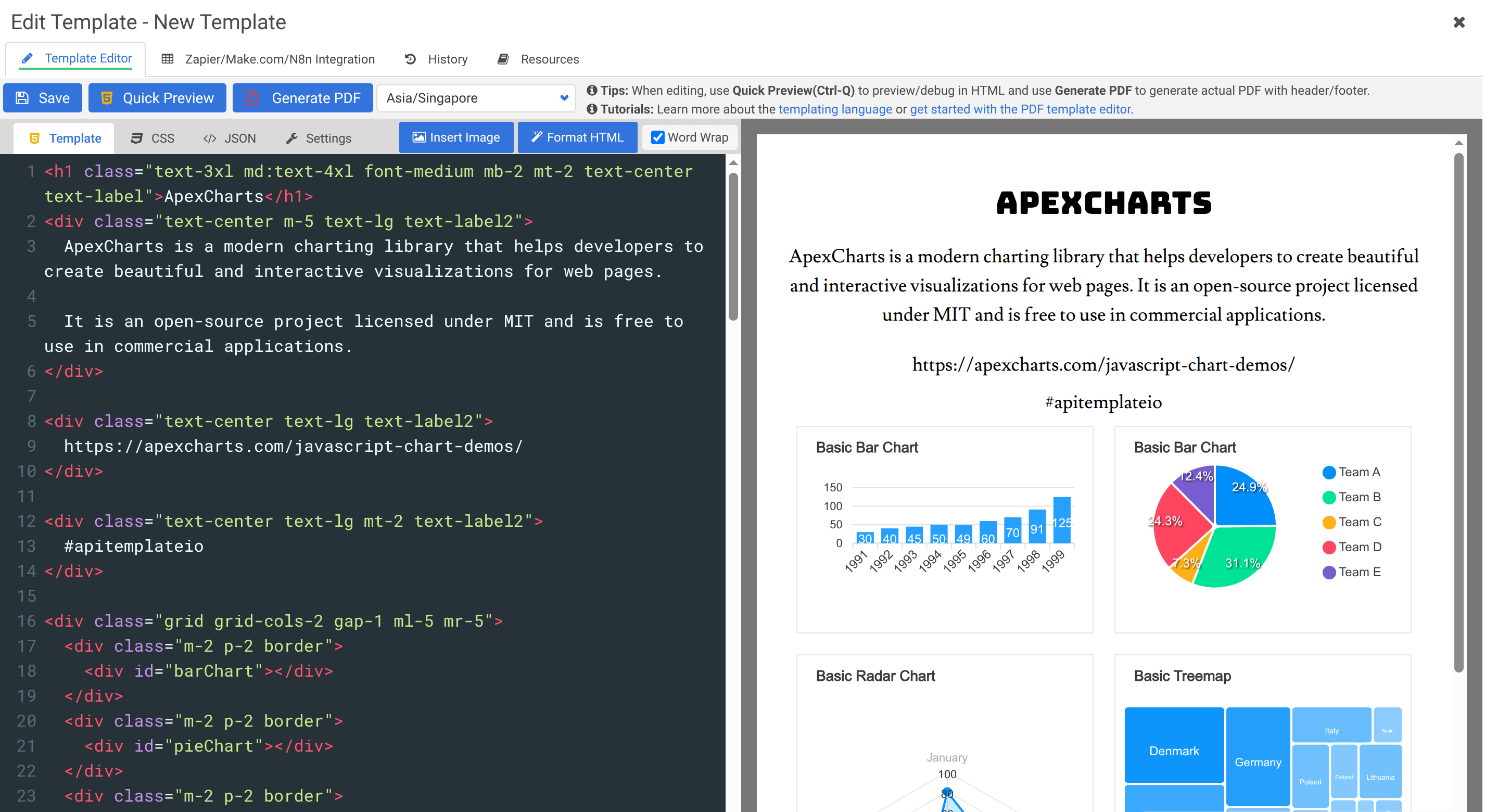
The four tabs are:
- Template — your HTML with Jinja2 variables
- CSS — styles for your document
- Sample JSON — test data for previewing
- Settings — page size, margins, headers, footers
- Enter some HTML in the Template tab:
<h1>Hello, {{name}}!</h1>
<p>This is your first PDF generated with APITemplate.io.</p>
<p>Today's date: {{date}}</p>
- In the Sample JSON tab, add:
{
  "name": "World",
  "date": "2026-03-28"
}
- Click Quick Preview to see the result, or Generate PDF to produce the actual PDF file
Step 2: Note your template ID
Your template ID is shown on the Manage Templates page. You'll need it for API calls.
Step 3: Call the API
curl -X POST "https://rest.apitemplate.io/v2/create-pdf?template_id=YOUR_TEMPLATE_ID" \
  -H "X-API-KEY: YOUR_API_KEY" \
  -H "Content-Type: application/json" \
  -d '{
    "name": "World",
    "date": "2026-03-28"
  }'
Replace YOUR_TEMPLATE_ID with the template ID from your dashboard and YOUR_API_KEY with your API key.
For the full list of parameters, output options, and error codes, see the REST API Reference (v2).
No-code alternatives
If you prefer not to write code, you can generate PDFs through no-code integrations:
- Zapier — Set up a Zap that triggers PDF generation from events in Google Sheets, HubSpot, Airtable, or hundreds of other apps
- Make.com — Build a scenario that generates PDFs as part of a multi-step automation workflow
- n8n — Use an open-source, self-hostable workflow platform to automate PDF generation with 300+ integrations
- Bubble.io — Generate PDFs directly from your Bubble app using the official APITemplate.io plugin
- Airtable — Connect Airtable records to templates and generate PDFs in bulk
- REST API — Integrate PDF generation into any application with full control over the API
Step 4: Download your PDF
The response includes a download_url. Open it in your browser or use it in your application to access the generated PDF.
That's it! You've just generated your first PDF with APITemplate.io.
Learn more
- Code/HTML Template Editor — deep dive into the editor
- Template Language (Jinja2) — learn variables, loops, and conditions
- Headers and Footers — add logos and page numbers
- Zapier Integration — automate PDF generation without code
- n8n Integration — automate with an open-source workflow platform
- Bubble.io Integration — generate PDFs from Bubble apps