n8n Integration
n8n ("nodemation") is an open-source, low-code workflow automation platform with over 300 integrations. Combined with APITemplate.io, you can automate PDF generation from databases, APIs, webhooks, SaaS apps, and more — using a visual drag-and-drop editor.
With this integration you can:
- Generate PDFs (invoices, reports, certificates, contracts) triggered by events in any connected app
- Automate recurring documents such as weekly reports or monthly statements using cron triggers
- React to real-time events like Stripe payments, form submissions, or database changes
- Deliver documents via email, cloud storage, or webhook responses
Watch this video to see how to connect n8n with APITemplate.io and automate PDF generation:
For the full step-by-step walkthrough with additional details, see the original blog post: How to Generate PDF Documents with n8n and APITemplate.io
Prerequisites
You need accounts on both services:
- n8n — self-host or sign up for n8n Cloud at n8n.io
- APITemplate.io — sign up at app.apitemplate.io
Step 1 — Create a PDF template in APITemplate.io
- Log in to APITemplate.io and go to Manage Templates
- Click New PDF Template
- Choose between the Visual Editor or HTML Editor
- Define variables like
{{name}},{{invoice_number}}, or loops such as{{#each items}} - Save the template and copy the Template ID
- Copy your API key from the API Integration tab
Make sure your variables are well structured. For example, an invoice template might include {{due_date}}, {{total}}, and an array of items.
Step 2 — Set up APITemplate credentials in n8n
- Open your n8n instance
- Go to Credentials > New Credential > search for APITemplate.io
- Choose API Key and paste the key from your APITemplate dashboard
- Save the credentials
Having credentials stored in n8n allows you to reuse them across multiple workflows.
Step 3 — Build the workflow
i. Choose a trigger
Pick a trigger node depending on your use case:
| Trigger | Use case |
|---|---|
| Manual Trigger | Testing and development |
| Cron Trigger | Recurring PDFs (e.g. weekly reports) |
| Webhook Trigger | On-demand generation (e.g. form submissions) |
| App-Based Triggers | React to changes in Airtable, Stripe, Google Forms, etc. |
ii. Collect and prepare data
Use nodes to fetch and shape data before sending it to APITemplate.io:
- HTTP Request — fetch data from an external API
- MySQL / PostgreSQL — query a database
- Google Sheets — retrieve spreadsheet data
- Function / Set Node — transform your JSON to match the template variables
Example JSON payload:
{
  "name": "Jane Doe",
  "invoice_number": "INV-1001",
  "items": [
    { "description": "Widget A", "price": 25 },
    { "description": "Widget B", "price": 45 }
  ],
  "total": 70,
  "due_date": "2025-07-31"
}
iii. Generate the PDF
There are two methods to generate the PDF.
Method 1: APITemplate.io node (V1 API)
Add an APITemplate.io node:
- Operation: PDF → Create
- Use your saved credential
- Set the Template ID
- Paste your JSON into the data field
The built-in n8n node currently uses the V1 API.
Method 2: HTTP Request node (V2 API — recommended)
To take advantage of V2's performance improvements and new features, use an HTTP Request node instead. See the V2 API reference for full details.
Configure the node as follows:
| Setting | Value |
|---|---|
| Method | POST |
| URL | https://rest.apitemplate.io/v2/create-pdf |
| Authentication | Generic Credential Type |
| Generic Auth Type | Header Auth |
| Body | Raw JSON |
Set query parameters for template_id (and optionally expiration). Additional parameters are documented in the API reference.
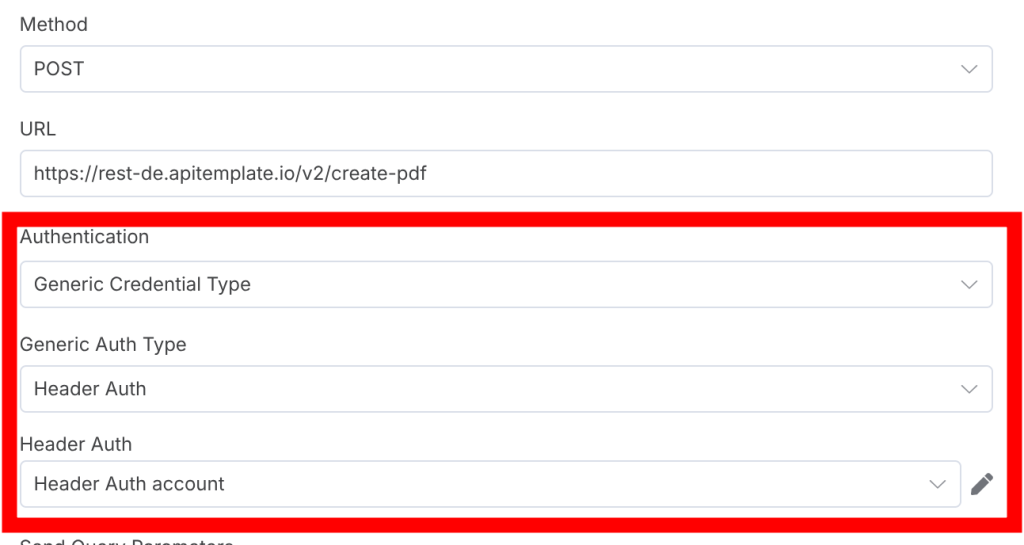
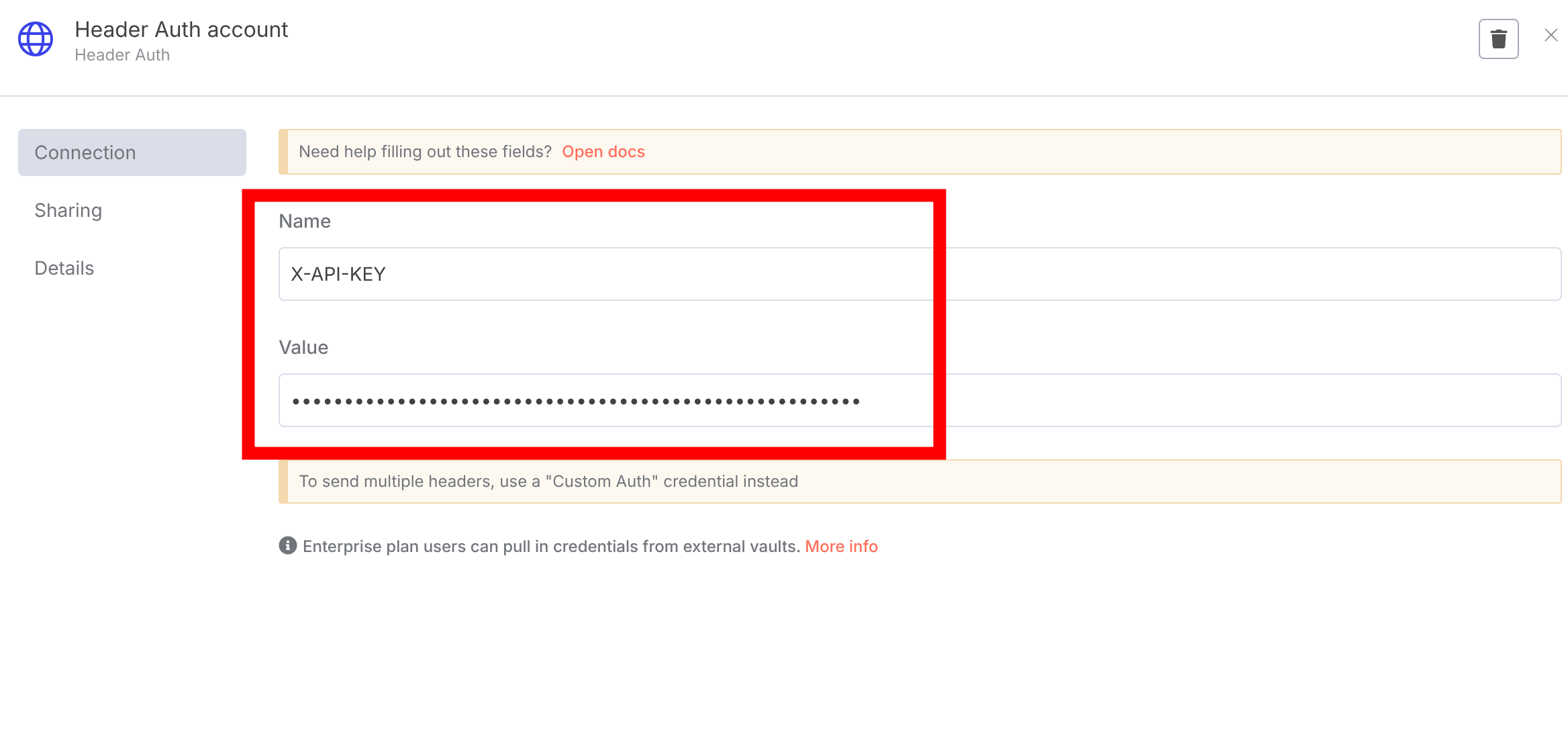
For header authentication, use X-API-KEY as the name and enter your API key:
Sample HTTP Request node JSON (copy and paste into n8n)
Copy the JSON below, then go to your n8n workflow and paste it with Ctrl+V to create the node automatically:
{
  "nodes": [
    {
      "parameters": {
        "method": "POST",
        "url": "https://rest.apitemplate.io/v2/create-pdf",
        "authentication": "genericCredentialType",
        "genericAuthType": "httpHeaderAuth",
        "sendQuery": true,
        "queryParameters": {
          "parameters": [
            {
              "name": "template_id",
              "value": "YOUR_TEMPLATE_ID"
            },
            {
              "name": "expiration",
              "value": "5"
            }
          ]
        },
        "sendBody": true,
        "specifyBody": "json",
        "jsonBody": "{\n  \"name\": \"Jane Doe\",\n  \"invoice_number\": \"INV-1001\",\n  \"items\": [\n    {\"description\": \"Widget A\", \"price\": 25},\n    {\"description\": \"Widget B\", \"price\": 45}\n  ],\n  \"total\": 70,\n  \"due_date\": \"2025-07-31\"\n}",
        "options": {}
      },
      "type": "n8n-nodes-base.httpRequest",
      "typeVersion": 4.2,
      "position": [-340, -100],
      "id": "0ced6f1a-276c-4af5-b40f-aac5387b5174",
      "name": "HTTP Request",
      "credentials": {
        "httpHeaderAuth": {
          "id": "",
          "name": "Header Auth account"
        }
      }
    }
  ],
  "connections": {},
  "pinData": {},
  "meta": {
    "instanceId": ""
  }
}
The response includes a download_url to access the generated PDF. You can view this URL in the execution log or pass it forward in the workflow.
iv. Download or share the PDF
Use an HTTP Request node to GET the file from the download_url. Then:
- Send it via email using the Gmail or SMTP node
- Upload it to Google Drive, Dropbox, or Amazon S3
- Return the link via Webhook Response for front-end integration
- Store metadata in Notion or Airtable alongside the document
Advanced tips
Asynchronous PDF generation
For large files, APITemplate.io supports asynchronous processing. Add a webhook_url parameter to your request, and APITemplate will POST to your n8n webhook once the file is ready — preventing timeouts for long-running jobs.
Debugging workflows
- Use Manual Executions to test each node and view live output during development
- Pin Data in nodes to simulate results without re-fetching
- Use Execute Step to isolate and test one node at a time
- Leverage Logs and Error Handling to catch API failures and add retry logic using error branches
Version control
- Use environment variables in n8n to manage template IDs and credentials across dev, staging, and production
- Back up your APITemplate HTML or JSON templates for version tracking and rollback
- Document changes to workflows and templates to maintain a clear history
Example workflows
- Stripe → Invoice PDF — payment webhook triggers PDF generation, emails the invoice, stores a copy in Google Drive
- Google Sheets → Report PDF — new row triggers a data-rich PDF report
- Webhook → Certificate PDF — form submission generates a personalized certificate and returns the download URL
- Cron → Monthly report — scheduled trigger fetches database data and generates a recurring report
- Airtable → Proposal PDF — new record triggers a custom proposal document with client-specific data
Tips
- Use the V2 API via the HTTP Request node for better performance and access to the latest features
- The built-in APITemplate.io node uses V1 — for new workflows, prefer the HTTP Request approach
- Chain multiple actions after generation: upload to storage, send an email notification, log to a database
- Use n8n's Function Node to transform data from any source into the JSON shape your template expects