Get Your API Key
Your API key is what authenticates your requests to the APITemplate.io API. You'll need it for REST API calls, SDK usage, and connecting third-party integrations like Zapier and Make.com.
Where to find your API key
- Log in to https://app.apitemplate.io
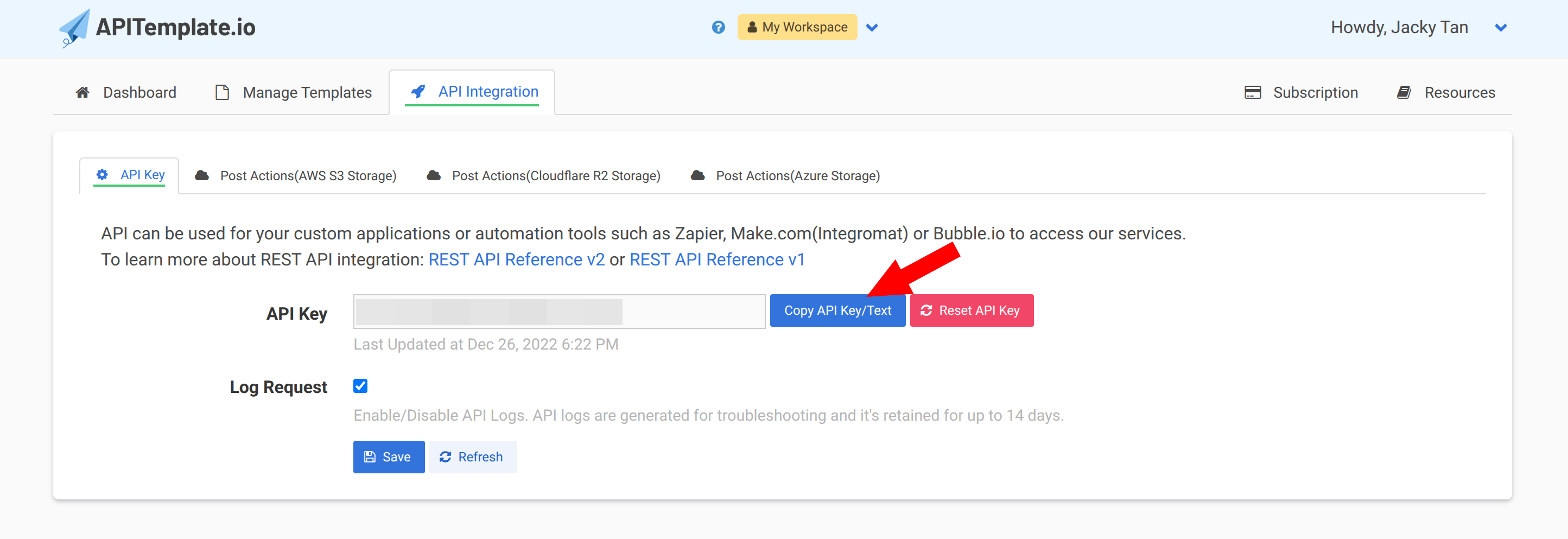
- Navigate to API Integration in the top navigation bar, or go directly to https://app.apitemplate.io/manage-api/
- Click Copy API Key/Text to copy your API key
Using your API key
Include your API key in the X-API-KEY header of every API request:
curl -X POST "https://rest.apitemplate.io/v2/create-pdf?template_id=YOUR_TEMPLATE_ID" \
  -H "X-API-KEY: YOUR_API_KEY" \
  -H "Content-Type: application/json" \
  -d '{"name": "John Doe"}'
Keep it safe
Your API key is a secret. Don't share it publicly or commit it to version control. If you think your key has been compromised, you can regenerate it from the API Integration page.
Team API keys
If you're working with a team, each team has its own API key. Team API keys are separate from your personal API key. See the Teams section for more details.
Next steps
Got your key? Let's create your first template.