Image Template Editor
The Image Template Editor is a visual, drag-and-drop tool for creating image templates. No HTML or CSS knowledge is required — just arrange elements on a canvas and generate images by swapping out the data.
Getting started
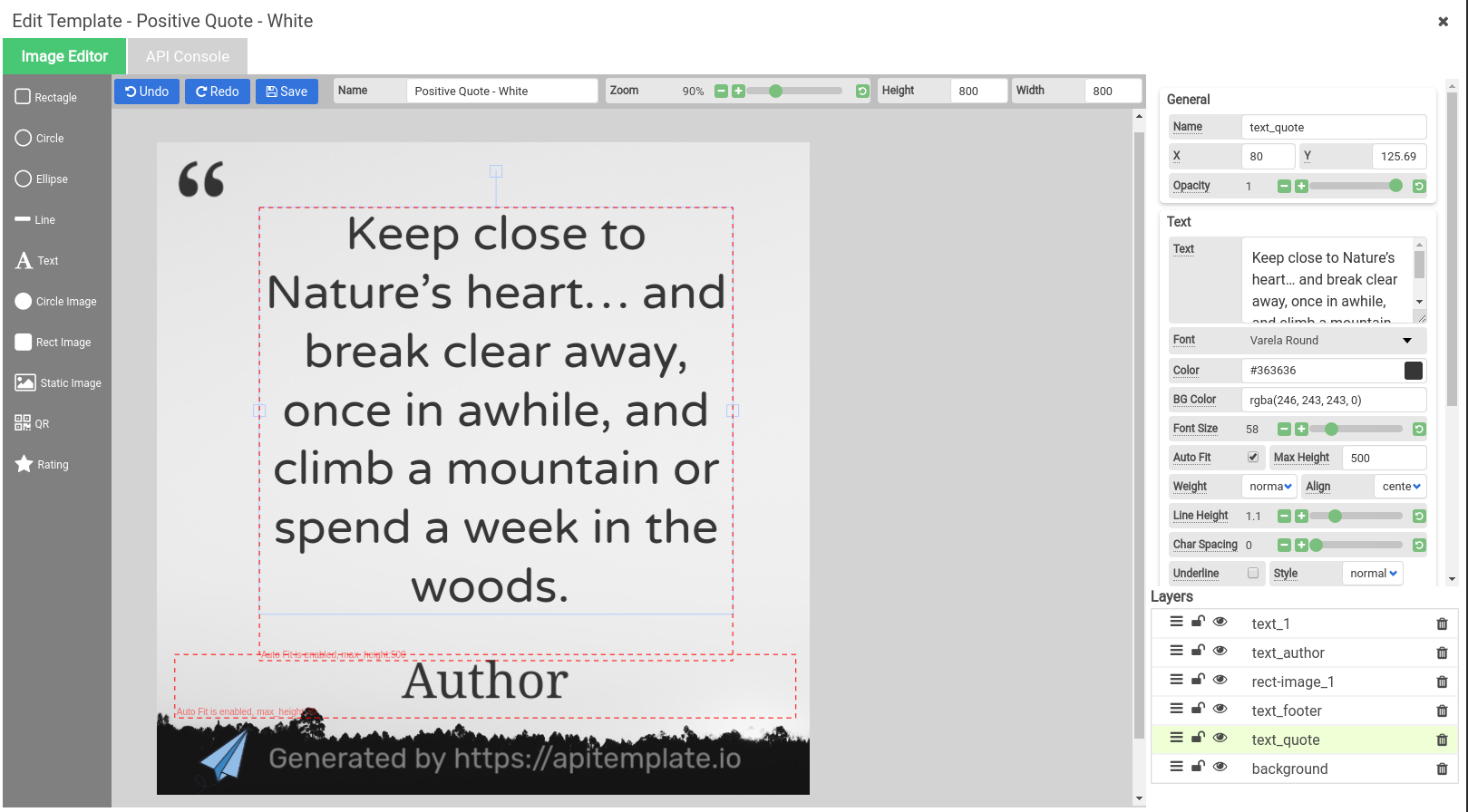
- Go to Manage Templates > New Template > Image Template
- Pick a preset size (Instagram, Facebook, Pinterest, etc.) or set custom dimensions
- Click Launch Image Editor on your template
What's on the canvas
The editor gives you a canvas where you can add and arrange elements:
- Text — headlines, subtitles, body text with font, size, color, and alignment controls
- Images — backgrounds, logos, photos (upload or use a URL)
- Shapes — rectangles, circles, and lines
- QR Codes — dynamically generated from your data
- Barcodes — multiple formats supported
Each element has a name that becomes the key you use in your JSON when generating images through the API.
Naming your elements
Give your dynamic elements descriptive names. For example:
headlinefor the main textsubtitlefor secondary textbackground_imagefor the backdroplogofor your company logo
These names are what you'll reference in the API request to change the content.
Using the API Console
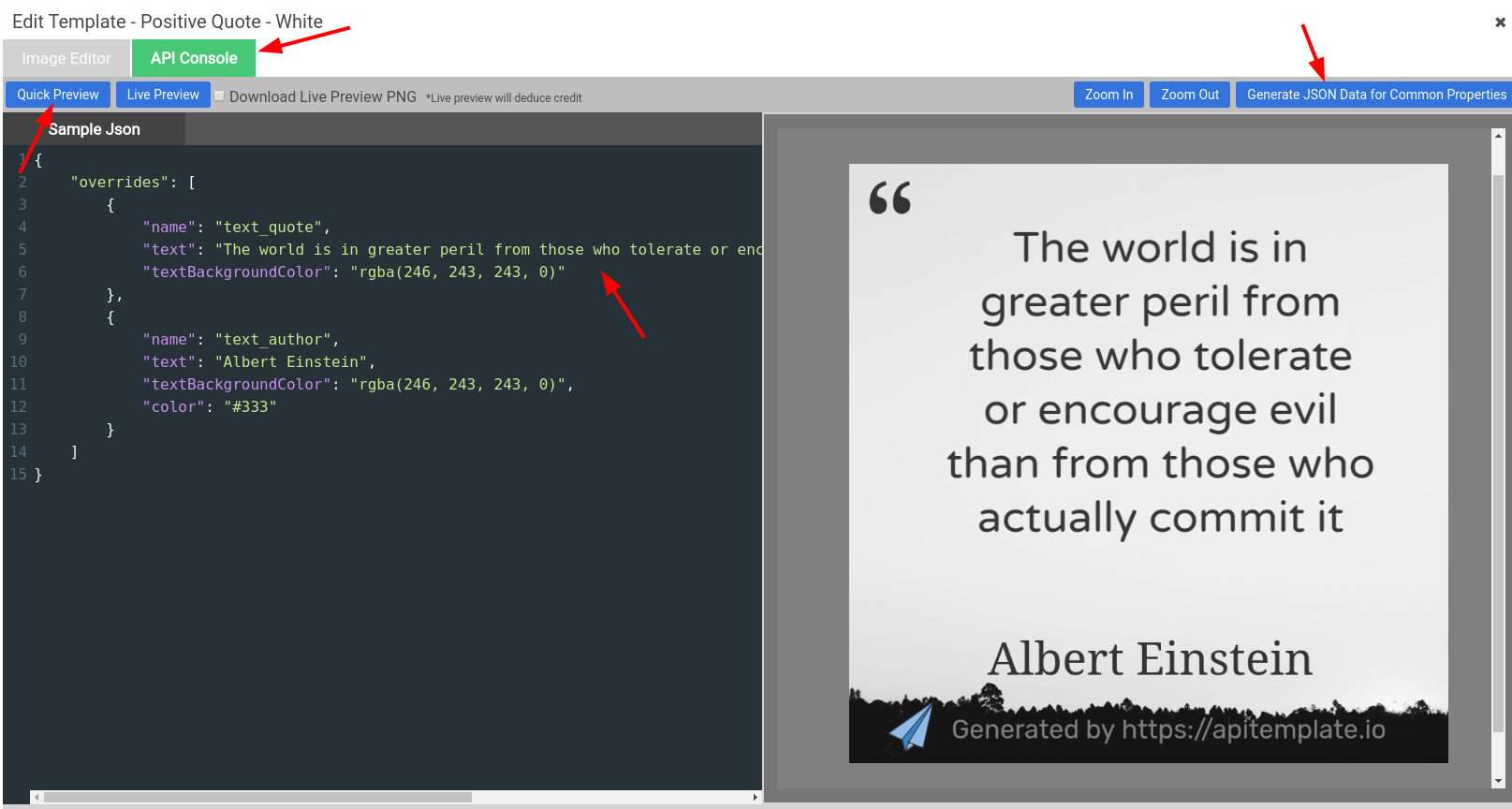
The API Console tab in the editor lets you test image generation without leaving the browser:
- Click Generate JSON Data for Common Properties to auto-generate sample JSON
- Edit the JSON to change text, images, or other properties
- Click Quick Preview to see the result instantly
- Use Live Preview to download the actual PNG
Example JSON
{
  "overrides": [
    {
      "name": "headline",
      "text": "Summer Sale — 50% Off!"
    },
    {
      "name": "subtitle",
      "text": "Limited time offer"
    },
    {
      "name": "background_image",
      "src": "https://example.com/summer-bg.jpg"
    }
  ]
}
Generating images via the API
Once your template is ready, generate images with a POST request:
curl -X POST "https://rest.apitemplate.io/v2/create-image?template_id=YOUR_TEMPLATE_ID" \
  -H "X-API-KEY: YOUR_API_KEY" \
  -H "Content-Type: application/json" \
  -d '{
    "overrides": [
      {
        "name": "headline",
        "text": "New Product Launch"
      }
    ]
  }'
The response includes a download_url for the generated image.
For the full list of endpoints, parameters, and response fields, see the API Reference v2.
Integrations
You can also generate images through no-code platforms:
Or integrate directly using the REST API with official SDKs for Python, JavaScript, PHP, C#, and Java.
Use cases
- Social media posts — Instagram, Facebook, LinkedIn, Twitter/X
- Banner ads — promotional banners in various sizes
- Open Graph images — dynamic preview images for links
- Certificates — personalized certificates and badges
- E-commerce — product images with prices and descriptions
- Infographics — data-driven visual content
Tips
- Use Auto-Position to create responsive templates that adjust to different text lengths
- Use Smart Crop to automatically find the best crop for photos
- Keep element names consistent across templates so you can reuse the same API calls