
Compress PDF to 200KB
Many application portals, exam boards and government forms reject PDFs over 200 KB. This compressor opens set to that limit: upload your PDF and it resamples the images inside it, trying stronger settings until the file fits, then shows the final size before you download. It runs in your browser, so your document is never uploaded.
Shrink your PDF below 200 KB for online forms and email
How to Compress a PDF to 200KB in 3 Steps
1. Upload Your PDF
Drop your PDF into the tool or click to choose it. The 200 KB target is already selected.
2. Let It Find the Settings
The compressor lowers image quality and resolution a step at a time until the file is under 200 KB, and shows each pass as it runs.
3. Check and Download
Check the final size, then download. If 200 KB can’t be reached, you get the smallest version it managed and the size it reached.
Why Use This 200KB PDF Compressor?
Made for the upload limit, not for guessing at sliders.
Built for the 200 KB Limit
No DPI or quality numbers to guess at. The form asks for 200 KB, and the tool works out the settings that get there.
Never Uploaded
Compression runs in your browser with WebAssembly, so ID scans, certificates and mark sheets stay on your device.
Honest About the Result
It shows the size it reached. If a file can’t get under 200 KB, it says so and gives you the smallest version it made, rather than claiming success.
Text Stays Sharp
Only photos and scans are resampled. Text and vector graphics are left as they are, so a compressed form is still crisp and searchable.
Other Sizes Too
Need 100 KB, 500 KB or 1 MB instead? Change the target in the tool, or pick a preset to compress without a size limit.
Free, No Sign-up
No account, no watermark, and no limit on how many PDFs you compress.
Build Document Automation That Scales With APITemplate
APITemplate is an API-first platform that generates professional PDFs and images at scale from reusable templates, raw HTML, or URLs. Integrate via REST API, SDKs, or no-code tools like Zapier, Make, and n8n. Still comparing providers? Our alternatives and comparisons show how APITemplate stacks up.
Create Document Templates with Visual Editor
Create stunning PDFs using our WYSIWYG Template Editor. With its user-friendly interface, you can design templates visually — no coding required.
Combine your designs with JSON data to generate dynamic, fully-customized PDFs tailored to your needs. Perfect for invoices, reports, certificates, and more. Most teams start with invoice automation from one reusable template.

Convert HTML to PDF
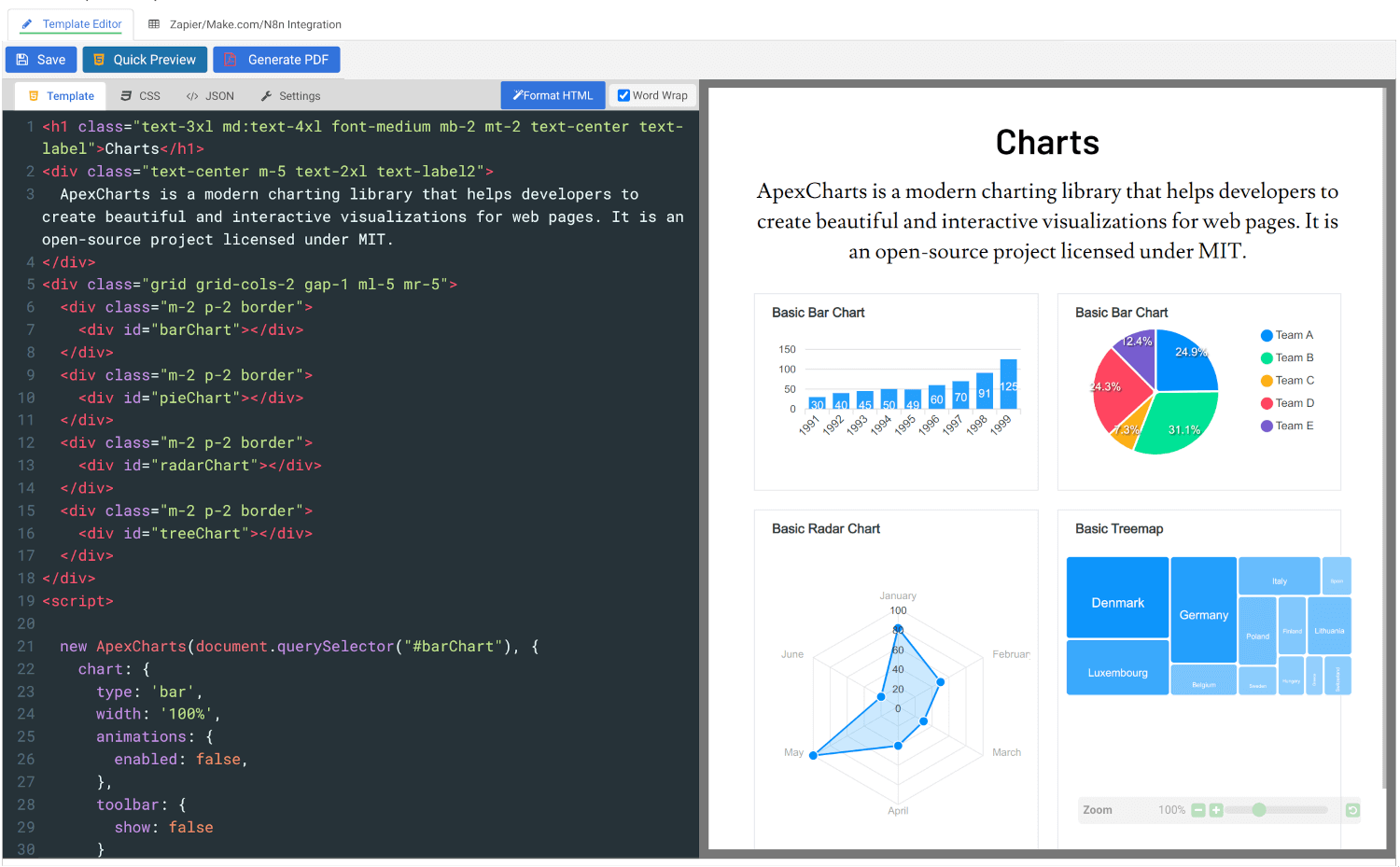
Convert HTML to PDF using APITemplate.io’s powerful HTML Template Editor. Combine your HTML, CSS, and JavaScript skills with dynamic JSON data to create custom templates that deliver pixel-perfect PDFs.
Our PDF generation solution supports modern web technologies, enabling seamless integration for your automated workflows, reports, and more.
Customer Reviews
Trusted by businesses worldwide to generate millions of PDFs and images reliably. See what our customers have to say.
 Jamie DearFounder
We are very grateful to Jacky and the team at APITemplate - their software has helped us to auto-generate high quality images for our student reports. It has been the perfect fit for us as we grow our Oxford summer school.
 Alex DowdingVice Secretary
The Wheelchair Football Association
We've successfully automated YouTube thumbnails and match event creation for our Powerchair Football league using your templates. It integrates with our Postgres database on retool.com, is expanding to include league table graphics and match results. Thanks to an AWS Inclusion and Diversity grant, we're enhancing our live-streaming workflow, further boosted by your product's automation capabilities. We're grateful for your excellent service and wanted to share our positive experience.
 Nishitha DhanekulaCofounder /CTO
At askreferral.io, We are building referral networking platform for people to pitch and generate leads for different kinds of referrals, including, but not limited to job referrals, product referrals, funding referrals, realtor referrals etc. Having a vibrant social media community is crucial for our growth and APITemplate.io played crucial role in automating generation of digital posters for job postings, profile pitches, funding requests etc, to help us grow from 0 to 200K+ followers in LinkedIn in less than one year.
 Danaé NicolasCTO
We've been using APITemplate.io to generate social images for our karting races and it's been a huge time-saver. The support team is super responsive and helpful - they quickly resolved an issue we encountered. We highly recommend this tool to anyone who needs a similar solution.
 Ryan TurnbullIT Manager
APITemplate.io is such an easy application to use. Simple, intuititive, and code free. At simplehuman, we render all our commercial invoices, dispatch notes, and multiple other templates. The ability to create multiple layouts, and group them into a logical container - makes our lives much simpler. This is a great tool to use, both affordable, and the support service turnaround time is second to none! Defintely worth the subscription!
 Ron P.Product Manager
Had an issue with template implementation via Make and reached out for support. Within minutes, I got a response and was soon on a Zoom call resolving it. Despite the issue not being directly related to APITemplate.io, their team efficiently guided me to the right formatting. Many thanks!
 Nicholas GertzProduct Owner
We have been using the service daily in our application for a year and are very satisfied with the reliability. It meets all our requirements and requests for changes/improvements can be discussed directly with Jacky 1:1. Thanks and greetings from Germany
 Lucas FridmanChief Product Officer
We use APITemplate to generate key documentation we need to work with our industry partners. We are building a digital solution in an antiquated industry, which means we need to communicate data to our partners in the format that they are accustomed to (pdf forms). APITempate makes it easy for us to do this!
 Jean-Paul HornPublisher
We love APITemplate.io for its simplicity and ease of use. Just setup once and "forget" about it due to its fabulous 3rd party integration. New features are regularly added, and reasonable custom requests are honoured within days.
 Kevin Frickē
APITemplate.io is one of the best services I have worked with in a very, very long time. They are super responsive and a joy to work with. If you are struggling with PDF's, like I was, check 'em out!
 Jacob MonashAutomation Specialist
We run conferences with a number of speakers, each requiring an individual speaker profile. We used to create all of these profiles manually, but by incorporating APItemplate into our Zapier workflow, our team can generate a complete image with all of the speakers information in one click. Using the template editor is a bit of a learning curve, but the support team is very responsive and helpful.
 George Cooper
APITemplate.io is great. I love being able to quickly use HTML and CSS templates with dynamic variables to create documents. Support is also fast and responsive. Great vendor!
Frequently asked questions
How do I compress a PDF to 200 KB?
Upload the PDF above. The tool is already set to 200 KB, so it starts compressing straight away and stops as soon as the file is under the limit. Then check the size it shows and download the file.
Why can’t my PDF get under 200 KB?
The compressor makes a PDF smaller by shrinking the images in it. If most of the file is text, fonts or vector drawings, or it has many pages, there may not be enough image data to remove. Split the PDF and keep only the pages the form needs, or scan the paper again at 150 DPI, which is enough for most forms.
Will the PDF still be readable at 200 KB?
Text stays sharp, because it isn’t touched. Photos and scans lose detail as the quality drops, so zoom in on signatures, stamps and small print before you upload. A short scan often fits under 200 KB and still reads clearly; a long scanned document may not.
How do I check the size of a PDF?
On Windows, right-click the file and choose Properties. On a Mac, select it and press Command+I. On Android or iPhone, the Files app shows the size in the file’s details. The compressor also shows the original and compressed sizes.
Is it safe to compress ID documents and certificates here?
Yes. The PDF is processed in your browser with WebAssembly and is never uploaded to a server, so nobody else sees it.
Can I compress a PDF to 100 KB or 1 MB instead?
Yes. Change the target size in the tool, or open the main PDF compressor for presets and every size option.
What is APITemplate.io?
APITemplate.io is designed for generating PDF documents from reusable templates. It can be easily integrated with popular tools like Zapier, Airtable, Make.com, Bubble.io, n8n, UiPath, or directly via REST API, making it highly adaptable to various workflows.
There are three main ways to generate PDF documents using APITemplate.io:
- Template-based PDF generation: Create PDFs from predefined templates.
- HTML to PDF generation: Convert HTML content directly into PDF format.
- URL to PDF generation: Convert entire web pages to PDFs by simply providing their URLs.
The platform also supports custom CSS and JavaScript, allowing for advanced styling and customization. Its powerful template engine ensures that you can create complex documents efficiently, while the API Console enables you to preview and customize JSON data instantly.
In addition, APITemplate.io offers support for adding custom headers and footers, including page numbers and total page counts, making it an excellent choice for creating polished, professional PDF documents.
Related Free PDF Tools
Whatever comes next, compressing, merging, splitting, or converting APITempate has a free tool ready for it. Explore all free PDF tools and keep the work moving.
Still Managing PDFs Manually? It’s Time to Automate.
Use APITemplate to automate bulk invoices, reports, and certificates from reusable templates, raw HTML, or URLs. Integrate with Zapier, Make.com, n8n, or REST API.