Direct URL / Query String Generation
Direct URL lets you generate images using a simple HTTP GET request — no API key needed in the URL. This is perfect for embedding dynamic images in websites, emails, or anywhere you can put an image URL.
How it works
Instead of calling the API with a POST request and JSON, you construct a URL with query string parameters. The image is generated on the fly and cached on APITemplate.io's servers.
https://rest.apitemplate.io/v2/create-image-url/TEMPLATE_ID?auth=AUTH_CODE&headline.text=Hello+World
The generated images are cached automatically. A new image is generated only when:
- The query string parameters change
- The template itself is updated
This caching helps reduce your costs by reusing the same resources.
Setting up Direct URL
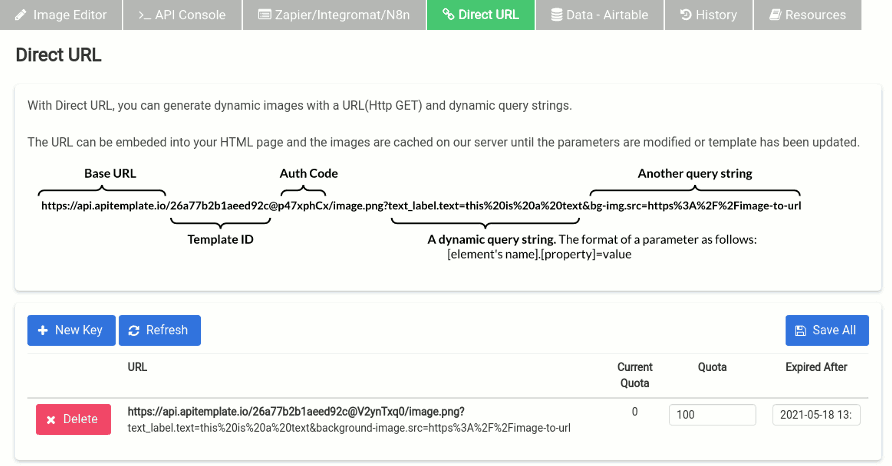
- Open your image template in the Image Template Editor
- Click the Direct URL tab
- Click Create New Key to generate an auth code
- Configure settings:
- Quota — limit the number of generations
- Expiration — set when the key expires
- Click Save All to save your settings
URL structure

A Direct URL consists of:
https://rest.apitemplate.io/v2/create-image-url/{template_id}?auth={auth_code}&{element.property}={value}
| Part | Description |
|---|---|
template_id | Your image template ID |
auth | The auth code generated in the Direct URL tab |
| Query parameters | Element properties in the format element_name.property=value |
Query string format
The query string parameters follow this pattern:
element_name.property=value
For example, if you have a text element named headline:
headline.text=Summer+Sale
If you have an image element named background:
background.src=https://example.com/image.jpg
Example
Say you have a template with:
- A text element named
title - A text element named
subtitle - An image element named
bg
Your Direct URL would look like:
https://rest.apitemplate.io/v2/create-image-url/abc123?auth=your_auth_code&title.text=Hello+World&subtitle.text=Welcome&bg.src=https://example.com/bg.jpg
Embedding in HTML
Use the Direct URL as an image source in any HTML page:
<img src="https://rest.apitemplate.io/v2/create-image-url/abc123?auth=your_auth_code&title.text=Hello+World" alt="Dynamic image" />
This works in:
- WordPress posts and pages
- Webflow sites
- Email templates
- Open Graph meta tags
- Any HTML page
Using as Open Graph images
Add the Direct URL to your page's meta tags for dynamic social sharing previews:
<meta property="og:image" content="https://rest.apitemplate.io/v2/create-image-url/abc123?auth=your_auth_code&title.text=My+Blog+Post" />
Each page can have a unique preview image by changing the query parameters.
Generating the URL
The Zapier/Integromat/N8n tab in the image editor shows you the element names and properties you can use. There's also a built-in tool in the Direct URL tab that helps you generate the full URL.